Bridge Tap Technical analysis
Oct 13, 2026
Bridge Taps on NBN: The Hidden Wiring Fault Killing Your FTTN Speed
If you're on an FTTN, FTTB, or FTTC connection and experiencing random dropouts, slow speeds during peak hours, or sync loss during video calls, the problem is likely not your provider. It's probably hiding in your walls.
A bridge tap is one of the most common—and most overlooked—causes of NBN performance issues on copper-based connections. This deep technical dive explains what bridge taps are, why they destroy VDSL2 signals, how to diagnose them, and what it takes to fix them.
What Is a Bridge Tap?
A bridge tap (also called star wiring) is a redundant branch of copper wiring connected to your main telephone line. It was standard practice in the pre-NBN era: phone lines would split at a junction point to feed multiple wall sockets throughout a home—one for the kitchen, one for the bedroom, one for the study.
On an old voice-only telephone network, this didn't matter. Voice signals operate at low frequencies (under 4kHz) and tolerated these branches fine.
On NBN's VDSL2 technology, it's a different story. VDSL2 pushes signal frequencies up to 17MHz–30MHz. At these frequencies, every unused copper branch acts like an antenna and a reflector, creating havoc with the signal.
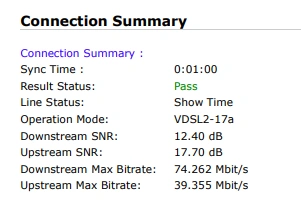
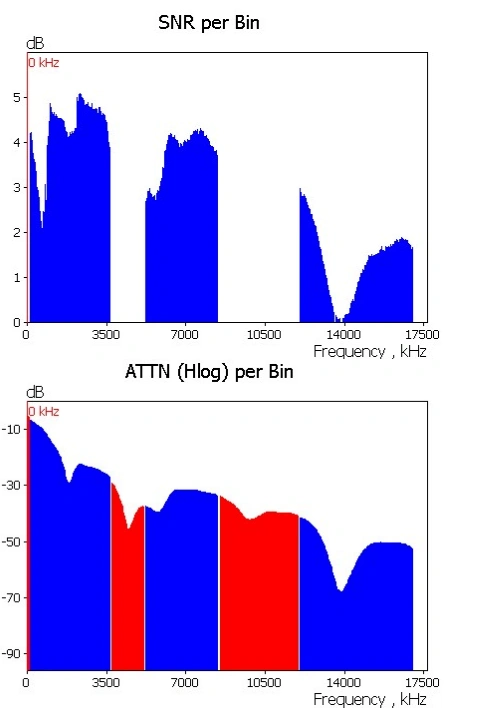
Here is a bridge tap shown by our test meter. Later in this post you will see how things are meant to look.
What Bridge Taps Look Like Physically
In practice, a bridge tap appears as:
Multiple cables connected to a single phone socket
Split wiring running in different directions from a junction box
Old alarm system cabling still connected to the line
Multiple phone points still electrically active when they don't need to be
NBN's own deployment documentation explicitly calls for the removal of bridge taps and star wiring during FTTN installation. The Australian standard for NBN copper pair lead-in states: "Remove all star wiring from first TO" (Telecommunications Outlet).
The Technical Mechanism: Why Bridge Taps Destroy VDSL2
Understanding why a simple extra wire causes such catastrophic performance requires looking at transmission line theory.
The Ideal Setup
In a properly wired FTTN connection, the copper pair runs as a single, uninterrupted path from the NBN node to your modem. The line terminates at one point—your modem's DSL port.
What Happens with a Bridge Tap
When a bridge tap exists, the signal encounters a T-junction. Here's the sequence of events:
Signal Splitting: The high-frequency VDSL2 signal reaches the junction and splits. Part continues to your modem; part travels down the unused branch.
Reflection at the Open End: The branch cable is unterminated (nothing is connected at the far end). In transmission line terms, this creates an impedance mismatch—essentially an open circuit. The signal hits this open end and reflects back toward the junction.
Echo and Interference: The reflected signal returns to the junction and continues toward your modem, arriving slightly delayed. Your modem now receives both the original signal and an echo of that same signal.
Frequency-Selective Fading: Because the delay depends on the branch length and signal frequency, certain frequencies arrive in-phase (constructive interference) while others arrive out-of-phase (destructive interference). This creates a comb-filter effect across the VDSL2 spectrum.
Signal-to-Noise Ratio Collapse: The echoes act as noise. Your modem's SNR margin drops. Error rates (CRC, FEC) spike. The modem reduces its sync rate or loses sync entirely.
Why High Frequencies Suffer Most
VDSL2 uses multiple frequency bands (up to 6 in profile 17a) to carry data. Low frequencies are used for basic connectivity and survive bridge taps reasonably well. High frequencies—which carry the bulk of your download speed—are the first to degrade.
This explains the classic symptom pattern:
Internet works fine in the morning
Drops out when the family streams Netflix or you join a video conference
Speed tests cause the modem to lose sync
Random disconnections throughout the day
The modem attempts to use high-frequency channels to meet bandwidth demand, those channels hit the bridge tap, and the resulting noise overloads the modem's error correction capabilities.
Star Wiring: The Extreme Case
Star wiring is bridge taps taken to the extreme. Instead of one branch, the line splits into multiple directions from a central point—like a spider web.
Each branch creates its own reflection pattern. The combined effect multiplies the interference. Star-wired homes with 4+ phone sockets can see sync rates collapse to a fraction of what the line length should support.
A Whirlpool forum user described their experience: after 18 months of dropouts and speeds as low as 2.55 Mbps downstream, NBN and their RSP finally identified a bridge tap in their house as the cause.
Diagnosing a Bridge Tap
Method 1: The Socket Test
The simplest diagnostic: plug your modem into each phone socket in your home and check if it achieves sync.
If the modem syncs at multiple sockets, you have a bridge tap. The line branches to reach each outlet.
However, there's a nuance: in a daisy-chain configuration (socket A → socket B → socket C), only the last socket in the chain avoids the bridge tap effect. Socket A and B have branches beyond them. In a star configuration (all sockets branch from one point), every socket suffers.
Method 2: Modem Line Statistics
Your VDSL2 modem's advanced statistics reveal bridge tap signatures:
Abnormally high line attenuation for your distance to the node
Low SNR margin (below 6dB is problematic)
High CRC/FEC error counts
Fluctuating attenuation readings between syncs
One user's stats showed downstream attenuation of 58.5 dB on a line that should have been ~35 dB based on distance. After bridge tap remediation, attenuation normalized.
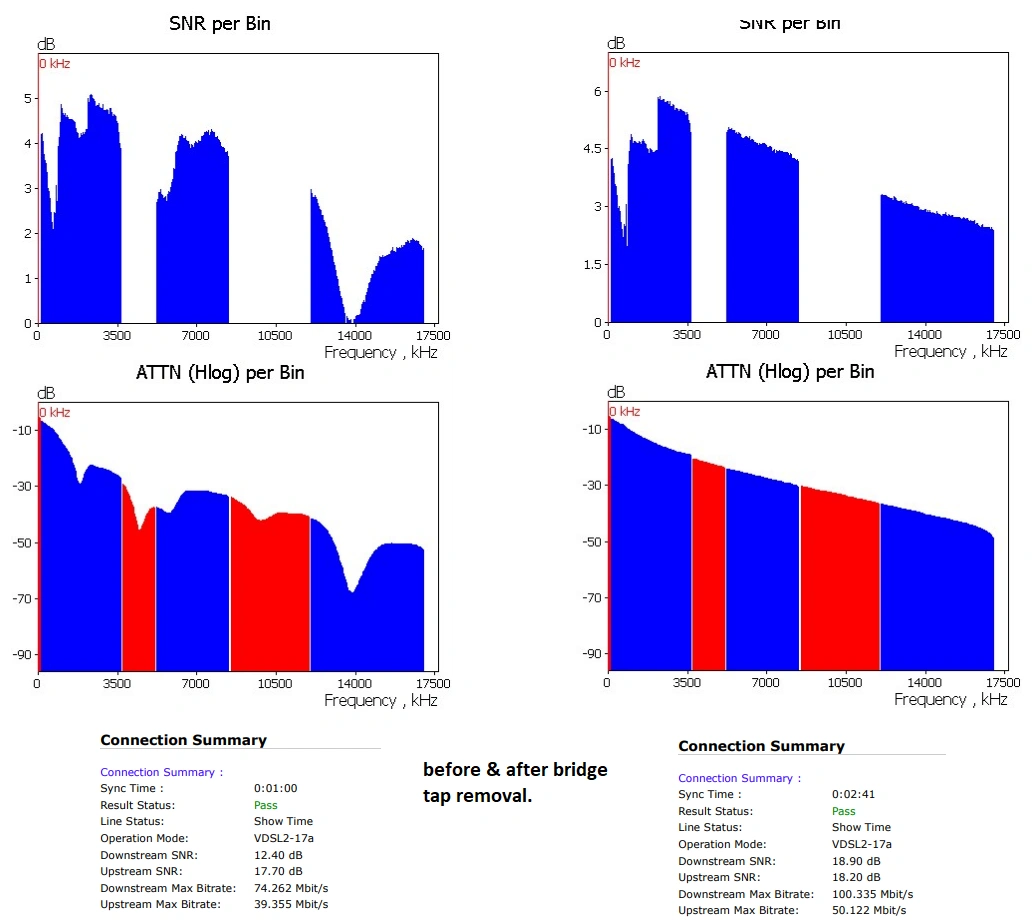
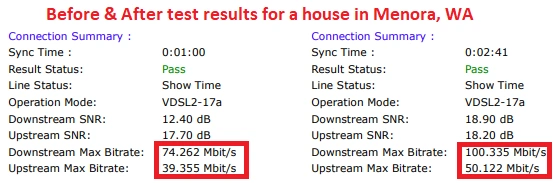
Here is a before and after from TechTV's own test meter:
Method 3: Professional Line Testing
A licensed cabler like TechTV Cabling uses a Time Domain Reflectometer (TDR) to send a pulse down the line and measure reflections. Each impedance mismatch—including bridge tap junctions—appears as a spike on the TDR trace, revealing both the presence and location of branches.
NBN's technical specifications explicitly reference the use of Alternative Electrical Length Estimation Method (AELEM) to reduce loop length estimation errors in the presence of bridged taps, and the reporting of valid Quiet Line Noise (QLN) data for "remediation of loop impairments such as bridged taps".
The Fix: What Actually Works
Who Can Fix It
Only ACMA-licensed telecommunications cablers and NBN-approved technicians are legally permitted to modify or remove bridge taps in Australia. DIY removal is not only risky but potentially illegal.
The Remediation Process
A professional bridge tap removal involves:
Line testing to confirm the fault and measure baseline performance
Tracing internal wiring to identify all branches and unused segments
Disconnecting or removing redundant branches at the junction point
Consolidating the line to a single, direct path from the entry point to your modem
Retesting to verify improvement in sync speed and SNR margin
Expected Outcomes
Costs for bridge tap removal typically range from $350-450 for a straightforward residential job, depending on complexity and access.
Whirlpool forum reports indicate that post-remediation sync rates often improve dramatically—some users went from unstable 42/10 Mbps connections to stable sync at 60/22 Mbps with attainable rates exceeding 130 Mbps.
Prevention: Wiring Best Practices for FTTN
If you're building or renovating, or having NBN installed for the first time:
Run a single, dedicated line from the lead-in point directly to your modem's location
Avoid daisy-chaining phone sockets on the same line used for VDSL2
Use Cat5e or Cat6 cable for the DSL segment from the lead-in to the modem—NBN's own guidelines recommend this
Remove or disconnect any legacy alarm system wiring that shares the phone line